FieldLab Desktop
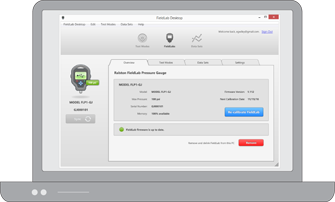
FieldLab Desktop is a Windows PC application designed to manage and configure Ralston digital gauges and perform data logging and calibration tests over USB equipped or RF wireless equipped Ralston Gauges.
Log in with your Ralston ID to download the latest version of FieldLab Desktop.
FieldLab Desktop 2.0.0
Release Notes
Released on July 13th, 2026
NEW: Gauges are no longer linked to one PC
Any gauge can now be connected to any PC running FieldLab Desktop — no linking or setup step required. Just plug it in (or connect over Bluetooth/wireless) and start using it.
• Techs can share gauges across a team or move between workstations freely.
• All device details (settings, datasets, test modes) are read directly from the gauge every time, so whatever PC you connect to shows the gauge's current configuration.
NEW: "Connected" and "Nearby" gauges
The main gauge screen now shows both Connected Gauges and Nearby Gauges (detected wirelessly but not yet connected).
NEW: Datasets can be downloaded to any PC
You can import/download data sets from any gauge your PC is connected to, with the option to delete them from the gauge after import to free up space.
NEW FieldLab FLP1 Test Mode Changes:
Test Modes can be read from the gauge and imported into the Test Library on another user's PC.
• Custom test modes stored on the gauge can now be read directly and imported into your Test Library on whatever PC you're using.
• New "Import" flow walks you through selecting a Test Mode from a new device and confirms once it's been added to your library.
• Gauges configured with custom Test Modes/Custom Units can be shared with other users, and they can import them to their PC.
Other notable improvements in this update
• Removed live reading and remote control of logging from gauge detail
• Bluetooth/wireless detection improvements — nearby gauges are now clearly distinguished from connected ones, with a "No gauges detected nearby" indicator when none are in range.
• Support for new and upcoming Ralston devices, including updated pressure ranges and unit handling.
• Improved error messaging
• Zero and calibration tools expanded — new "Restore Factory Zero" option alongside the existing calibration reset, allows zero-offset controls per channel and custom unit.
• Various UI cleanup across data export, calibration, and test mode screens (improved layout/spacing, clearer warnings).
System Requirements
- A PC running Windows 10 or Windows 11 is required.
- For wireless communication with bluetooth equipped gauges, a PC with bluetooth hardware is required.